Appearance
Preferences
Preferences customize unique aspects of Qubicle's interface and workflow.
How to Change Preferences
- On Windows, choose
Edit > Preferences. - On macOS, choose
Qubicle > Preferences.
Various Preferences
| Option | Description |
|---|---|
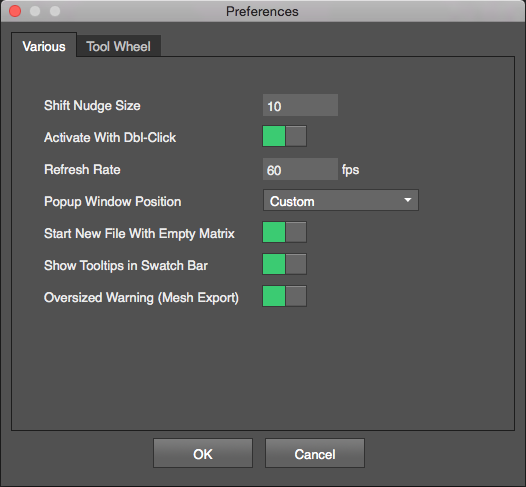
Shift Nudge Size | Sets how many units the object or selection will be translated using Shift + Arrow Keys. |
Activate With Dbl-Click | Enables double-clicking to enter and leave the Matrix Editor |
Refresh Rate | Sets the frame rate of the display |
Popup Window Position | Determines how pop-up windows are placed Custom use position of last opened window Centered display the window in the center of the screen Individual remembers the position of each window separately |
Start New File With Empty Matrix | Enable to automatically create a matrix when starting a new model. |
Show Tooltips in Swatch Bar | Toggles color code hints when the cursor hovers over a swatch. |
Oversize Warning (Mesh Export) | Shows a warning when a large model is likely to take a long time to export |
Tool Wheel Preferences
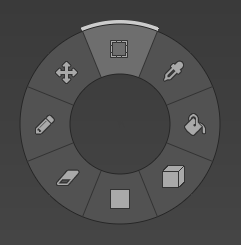
The Tool Wheel is a quick way to select different tools while editing an object. To open the Tool Wheel use Shift + Right Mouse Button.
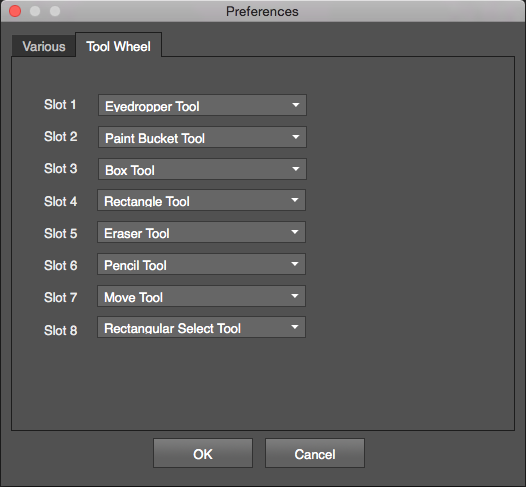
The Tool Wheel tab in the Preferences window allows you to choose tools for each slot of the tool wheel.